Comparisons
Tracked vs. ClickFlare: pricing and landing-page workflow
Choose between Tracked's hosted report-to-page-edit workflow and ClickFlare's documented tracking and integration stack, with billing and setup boundaries made explicit.

Evaluate Tracked when you want to host and edit landing pages beside campaign routes and conversion evidence. Keep ClickFlare on your shortlist when its documented conversion-API connections, cost sync, and configured flows match your requirements. A cheaper subscription is not a useful replacement if it breaks your affiliate callback or ad-platform feedback.
ClickFlare tracks pages hosted elsewhere. Tracked can host HTML or ZIP pages and keep the editor in the campaign workspace. That difference matters when a report leads to a page change. It does not establish integration parity or better campaign performance.
How we compared Tracked and ClickFlare
Tracked publishes this comparison. It is vendor-authored documentation and code research dated October 6, 2026, not an independent review or a benchmark of live campaigns. We read first-party ClickFlare pricing and help documentation, then checked Tracked's current import, editor, routing, postback, journey, provider-delivery, pricing, and signup source.
We compare the tasks a buyer must complete: deliver a page, route an offer click, receive a conversion, reconcile spend, and make the next edit. Documentation supports the competitor statements below. An undocumented feature remains unconfirmed, not absent.
For a broader shortlist, use ClickFlare alternatives. Start with the affiliate tracking software buying guide if you have not defined your requirements.
Compare the complete campaign workflow
| Buyer criterion | Tracked | ClickFlare |
|---|---|---|
| Page hosting and editing | Hosted HTML/ZIP files and visual editing; external redirect and approved proxy modes also available | Lander records reference externally hosted pages; ClickFlare explicitly does not host or modify them (lander documentation) |
| Traffic rules and weights | Conditional rules and user-configured page/offer weights | Conditional paths, AND/OR conditions, weighted distribution, and a required default path (path documentation) |
| Incoming conversions | Postbacks require a stored Tracked click ID; map the network's event and payout fields | Documents postbacks, pixels, scripts, supported API pulls, and manual uploads; a valid ClickFlare click ID is required (conversion documentation) |
| Outbound ad-platform feedback | Provider-specific, not universal; see the boundaries below | Publishes CAPI support including Facebook, Google Ads, and TikTok; configure each required connection (pricing and integration FAQ) |
| Spend and reporting | Campaign reports and event journeys; spend coverage varies by provider | Publishes cross-channel reporting and automatic cost sync; faster sync has priced add-ons (pricing) |
| Traffic automatically moved to a winner | In development; weights are set by the campaign owner today | Advertises AI traffic routing; confirm its eligibility, metric, and behavior for your funnel (pricing) |
| Team capacity | Display-only catalog limits: Solo one seat/five domains; Team five seats/unlimited domains. Confirm account terms | Starter: zero additional users/three domains; Pro: two additional users/six domains (pricing) |
| Operating responsibility | Configure domain, imported assets, offer links, callback, and provider connections | Configure tracker plus external page hosting, page code, offer links, callback, and integrations |
Do not equate team seats with identical permission controls. Confirm who can edit routes, view payout data, and manage credentials. Likewise, a reporting feature does not prove identical dimensions, retention, or export formats.
Compare monthly pricing without confusing annual rates
ClickFlare's pricing, read October 6, 2026, separates monthly cards from annual equivalents. Starter is $89 billed monthly for 1 million events. Pro is $219 billed monthly for 5 million. The displayed $69 and $169 monthly equivalents belong to annual billing, not month-to-month subscriptions.
Tracked's pricing section uses the current shared catalog. Its placeholder prices are Solo $79/month and Team $249/month. Its display-only allowances are 2 million and 10 million monthly events respectively. These are not confirmed live billing or capacity terms. Confirm the terms available to your early-access account before budgeting or moving volume.
| Listed plan | Monthly price basis | Listed allowance | Seats and domains |
|---|---|---|---|
| Tracked Free | Early access; confirm account terms | Display-only: 1,000 events/day | Display-only: one seat, one domain |
| Tracked Solo | Early access; confirm account terms | Display-only: 2 million events/month | Display-only: one seat, five domains |
| ClickFlare Starter | $89 billed monthly; $69/month equivalent annually | 1 million events/month | Zero additional users, three domains |
| ClickFlare Pro | $219 billed monthly; $169/month equivalent annually | 5 million events/month | Two additional users, six domains |
| Tracked Team | Early access; confirm account terms | Display-only: 10 million events/month | Display-only: five seats, unlimited domains |
This is a plan-selection table, not a like-for-like savings calculation. Unlike allowances and early-access terms make a blanket cost claim misleading.
ClickFlare defines events as tracked actions including visits, clicks, conversions, and postbacks. Its pricing FAQ lists overages of $0.04 per 1,000 events on Starter and $0.035 per 1,000 on Pro. It says tracking continues over the allowance. Do not assume Starter requires upgrading to Pro as soon as usage passes 1 million events.
Tracked's pricing describes activity such as visits, offer clicks, and conversions. A matched allowance does not establish identical counting rules. Tracked overage rates and enforcement terms are not confirmed by the reviewed catalog; ask before sending paid volume.
Add external page hosting, editing tools, storage, domains, and required sync add-ons to your worksheet. ClickFlare's pricing includes extra-domain packages, Link Guard, and faster cost-update options. A base subscription does not settle the total bill.
Separate conversion capture from ad-platform feedback
Both workflows need the affiliate network to return the correct tracker click ID. ClickFlare's documentation explicitly distinguishes incoming conversion tracking from outbound CAPI. Recording a sale in a tracker is not the same as delivering it to the ad platform.
Tracked's current delivery source supports Google Ads click-conversion uploads and configured Taboola and NewsBreak postbacks. These require the applicable connection, click identifier, event mapping, and delivery configuration. Review the provider setup boundaries before relying on feedback.
Tracked also has a Meta route for sending supplied events. That route is not automatic affiliate-postback-to-Meta feedback. A Meta token or stored dataset does not prove that an affiliate sale will be forwarded automatically. If that feedback is essential, establish the exact supported workflow before choosing Tracked.
ClickFlare publishes CAPI connections and automatic cost integrations. Its Starter and Pro cards also limit connected ad accounts and CAPI integrations. Verify your actual network, event type, account count, and required sync interval rather than counting logos.
An illustrative campaign from click to page edit
Illustrative workflow only — not an executed campaign or customer result. Suppose you own two HTML prelanders, Page A and Page B, leading to one affiliate offer. You want a controlled page comparison, not automatic winner selection.
| Step | Tracked workflow grounded in current source | Evidence to inspect in your own evaluation |
|---|---|---|
| Bring the page | Import HTML/ZIP assets and choose the starting HTML file | Assets, links, disclosures, and forms render as intended |
| Assign traffic | Set page weights and eligibility rules, with a default route | The selected page and offer match the campaign's configuration |
| Hand off the click | Use the tracked offer link and pass the Tracked click ID in the network's expected field | The network retains that ID, not the old ClickFlare macro |
| Receive the primary sale | Network returns the stored ID and payout through the generated primary callback, without an explicit conversion type | Follow the retained click to its primary conversion and check the recorded payout |
| Make the next edit | Inspect campaign evidence, then open the hosted HTML in the visual editor | Change page copy or the offer link in the same workspace; review the new version separately |
For this primary-sale example, leave the callback untyped. Explicitly typed callbacks record secondary funnel events and do not inherit payout. Do not assume adding a sale type preserves primary revenue.
The code basis is the page importer, weighted dispatcher, stored-click postback handler, journey service, and visual editor reviewed for this article. The example demonstrates their relationship, not traffic delivery accuracy, uplift, or a statistically significant winner.
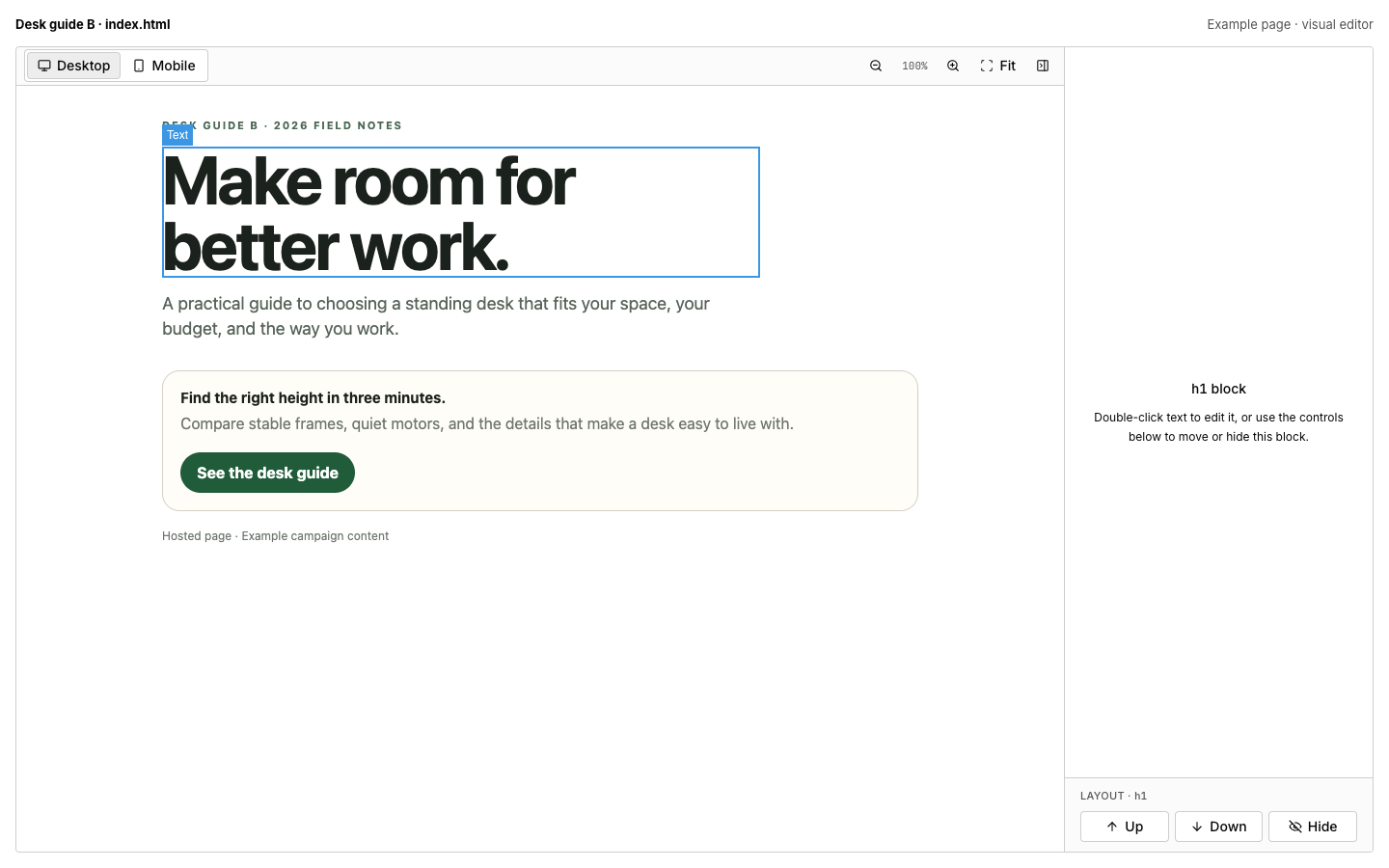
Example page in the visual editor, not customer-performance evidence.
The current campaign importer allows up to 250 files and 50 MB total, with a 2 MB HTML-file limit and a 25 MB per-file upload limit. A ZIP is an asset import, not proof that an external database, PHP application, or merchant checkout will run inside the hosted page workflow.
With ClickFlare, its documented lander record handles tracking configuration while the page edit remains in your external page stack. That can be a good fit if your existing hosting and editor already work well. Tracked's advantage to evaluate is fewer handoffs between campaign evidence and hosted-page editing, not exclusive ownership of that idea across the market.
Switching from ClickFlare: preserve old-click callbacks
Rebuild one known campaign before moving the rest. Use the ClickFlare-to-Tracked checklist and campaign setup guide to map its domain, assets, rules, offer links, and callback.
- Replace ClickFlare's click-ID macro with the identifier and link format generated by Tracked. Do not paste the old macro unchanged.
- Check missing IDs, duplicates, payout currency, and delayed conversions. Confirm any refund or rebill requirements separately.
- Reconcile reports using the same time zone, date range, conversion definition, and currency. Page-level profit uses allocated campaign spend; it is not a direct measurement of each page's ad cost.
- Keep the old callback route available for conversions from earlier clicks. Agree the transition with your network before changing destinations.
- Preserve reports and configuration records you need. Automatic historical-report import and a zero-downtime migration are not established here.
These are evaluation steps for your rollout. No new campaign checks were run for this article.
Where Tracked is today
Hosted files, visual editing, conditional rules, user-configured weights, inbound postbacks, campaign reports, and event journeys are current workflows. Signup is early access: use an invite or request access before creating an account.
Universal CAPI, automatic winner selection, and complete cross-device attribution are in development. Same-device anonymous continuity does not establish identity joins across devices. Provider-specific delivery is not universal coverage. Read the current CAPI guide for the distinction.
Frequently asked questions
Does ClickFlare host landing pages?
No, according to the first-party lander documentation checked October 6, 2026. It stores the page URL and tracking configuration; the page lives on your server or hosting platform.
Is Tracked cheaper than ClickFlare?
There is no confirmed blanket answer. Tracked's catalog has a placeholder Solo price of $79/month and a display-only allowance of 2 million events. ClickFlare Starter is $89 billed monthly for 1 million events and permits priced overages. Compare confirmed account terms, usage counting, required connections, and the retained page stack.
Can Tracked replace ClickFlare's CAPI connections?
Not as a universal replacement. Tracked's reviewed delivery workflow covers Google Ads uploads and configured Taboola/NewsBreak postbacks. Its supplied-event Meta route is separate from automatic affiliate-sale feedback. Check every required provider before switching.
Does Tracked automatically choose a winning landing page?
Not today. Automatic winner selection is in development. Campaign owners assign page and offer weights themselves.
Should I leave ClickFlare if my pages are already hosted elsewhere?
Not necessarily. Staying can be sensible when your hosting, integrations, and reporting work well. Evaluate Tracked if keeping hosted files and editing beside the campaign would solve a specific handoff problem.
Sources
First-party ClickFlare sources read October 6, 2026:
- Pricing, billing cadence, event definition, overages, connections, and add-ons.
- Lander hosting and tracking boundaries.
- Conditional paths and weighted distribution.
- Incoming conversion methods and outbound CAPI distinction.
Tracked descriptions were checked against current product source on the same date, including the shared plan catalog and its provisional-price note, the public pricing renderer, and invite-only signup. Consult current pricing and confirm your account terms. No production APIs or comparative campaign tests were used.
Start with the page workflow you need
Start free — Tracked early access. Use your invite or request access. Bring a page you own and one offer, confirm applicable plan terms, and assess the callback and editing workflow before moving established traffic.